

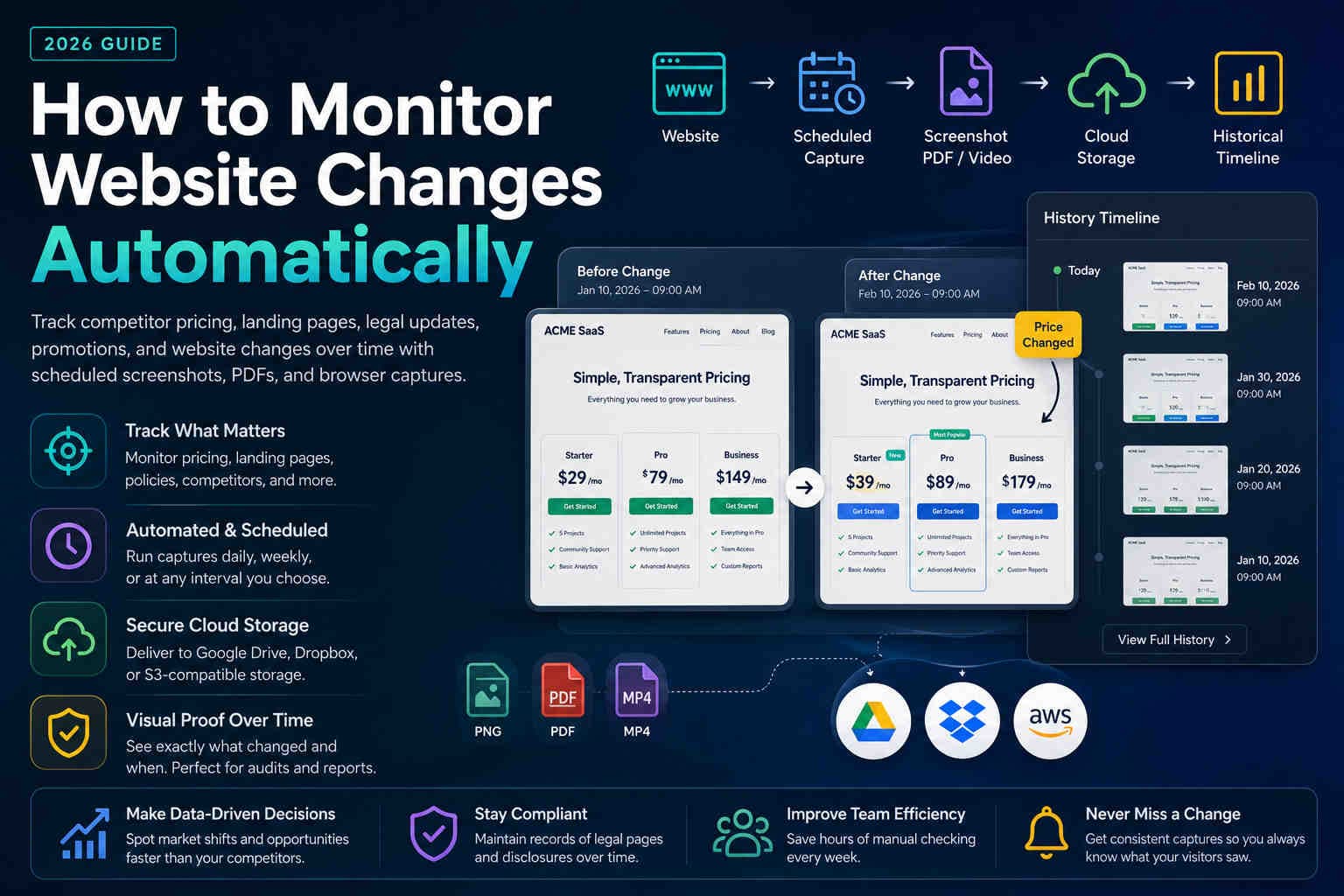
How to Monitor Website Changes Automatically
in 2026
Manual checking does not scale. Learn how teams track competitor pricing, landing pages, legal updates, promotions, and website changes using scheduled screenshots, PDFs, videos, and browser-based captures.
Websites change every day. Pricing pages are updated, landing pages rotate campaigns, competitors launch new offers, legal policies are revised, and mobile layouts can break without warning.
The challenge is not only knowing that something changed. The real challenge is knowing what changed, when it changed, and having a visual record of the previous version.
Monitor important pages without checking manually.
Keep screenshots, PDFs, and videos as historical records.
Deliver captures to Drive, Dropbox, or S3-compatible storage.
What website monitoring actually means
Website monitoring is a repeatable system for tracking visual and content changes over time.
Website monitoring means automatically checking important webpages on a schedule and preserving a record of what they looked like at each run.
Website URL
  ↓
Scheduled browser capture
  ↓
Screenshot / PDF / Video
  ↓
Cloud storage
  ↓
Historical timeline
This is especially useful for pages where the visual experience matters: pricing tables, banners, cookie notices, checkout screens, campaign pages, product pages, and competitor websites.
Why manual monitoring fails
Manual checking creates gaps, especially when pages change between review cycles.
Manual monitoring sounds simple: open the page every few days and check whether anything changed. In practice, it fails because website changes are often temporary, regional, or published outside normal business hours.
Manual checks miss
- Short campaigns
- Overnight updates
- Region-specific content
- Mobile-only changes
Automated captures create
- A reliable timeline
- Timestamped records
- Cloud-stored originals
- Repeatable review workflows
What pages should be monitored?
Start with pages that affect revenue, compliance, positioning, or customer trust.
Pricing pages
Track plan changes, discounts, packaging updates, feature tables, and promotional pricing.
Landing pages
Monitor headlines, CTAs, campaign banners, lead forms, and conversion-focused sections.
Legal pages
Preserve privacy policies, terms, cookie notices, disclaimers, and regulated disclosures.
Product pages
Track feature launches, positioning changes, screenshots, integrations, and availability.
Competitor monitoring
Track competitor websites without opening them manually every day.
Competitor monitoring is one of the strongest use cases for automated website captures. It helps marketing, sales, and product teams understand how the market changes over time.
- New pricing or discount campaigns
- Homepage redesigns
- New product positioning
- Feature comparison changes
- Launch announcements
Example workflow
A SaaS company monitors five competitor pricing pages every day at 9:00 AM. Each capture is delivered to an S3-compatible bucket and reviewed every Friday. Over time, the team builds a visual history of market movement.
Monitoring pricing changes
Pricing pages change quietly — but those changes are often strategically important.
Pricing pages deserve special attention because they directly affect buying decisions. Small updates to plan names, feature availability, discounts, or billing terms can signal bigger positioning changes.
| What to track | Why it matters |
|---|---|
| Plan prices | Detect increases, discounts, and regional price changes. |
| Feature tables | See when capabilities move between plans. |
| Promotional banners | Capture limited-time campaigns before they disappear. |
| CTA and checkout flow | Preserve what buyers saw before purchase. |
Monitoring legal and compliance pages
Compliance teams often need to prove what was published during a specific period.
Legal and compliance pages should not be treated as static. Privacy policies, terms of service, cookie banners, disclaimers, and disclosures can change over time.
- Privacy Policy
- Terms & Conditions
- Cookie notices and consent banners
- Affiliate disclosures
- Regulated claims or disclaimers
How often should monitoring run?
Frequency should match the importance and change rate of each page.
| Page type | Recommended frequency | Reason |
|---|---|---|
| Pricing pages | Daily | Pricing and promotions can change quickly. |
| Competitor landing pages | Daily | Campaign messaging changes often. |
| Promotions | Every few hours | Short campaigns may appear and disappear quickly. |
| Legal pages | Daily | Compliance records benefit from consistent history. |
| Documentation | Weekly | Useful for long-term product history. |
| Low-change pages | Monthly | Enough for background archiving. |
Screenshot vs PDF vs Video
Different output formats solve different monitoring problems.
Best for visual proof, before/after comparison, and long-term archives.
Best for audit packs, stakeholder reports, and shareable evidence.
Best for animations, scrolling behavior, menus, and dynamic interactions.
A practical monitoring workflow
Start small, then expand once your capture and storage workflow is stable.
- 1) Pick high-value pages: pricing, policies, landing pages, and competitor URLs.
- 2) Create Web Profiles for desktop, mobile, and any special capture settings.
- 3) Create Shot Schedules for daily, weekly, or campaign-based captures.
- 4) Choose output formats: screenshot, PDF, or video.
- 5) Deliver captures to Google Drive, Dropbox, or S3-compatible storage.
- 6) Review captures weekly and keep long-term archives for audits or research.
Common monitoring mistakes
Most monitoring systems fail because they are inconsistent, not because they lack features.
- Monitoring only the homepage: important changes often happen on pricing, product, checkout, and policy pages.
- Capturing too infrequently: monthly captures can miss short campaigns or temporary pricing changes.
- No cloud storage strategy: local folders become messy and hard to audit.
- No naming convention: files should be easy to sort by date, domain, and page.
- Ignoring mobile views: mobile users may see different layouts, banners, and CTAs.
FAQ
Quick answers.
Create scheduled browser captures for important URLs, generate screenshots, PDFs, or videos, and deliver the output to cloud storage for review and history.
Yes. Competitor pricing pages are one of the best candidates for daily captures because pricing, discounts, and feature tables can change quickly.
Use screenshots for visual proof and side-by-side comparison. Use PDFs for reporting, audits, and stakeholder sharing. Many teams store both.
Daily is a good baseline for pricing, competitor, and compliance pages. Weekly is often enough for documentation or slower-changing content.
Yes. Mobile layouts can show different navigation, banners, CTAs, and content. Use mobile device emulation for iPhone, Android, and tablet monitoring.
Start monitoring your key pages
Create schedules for your homepage, pricing page, legal pages, and competitor URLs. Capture screenshots, PDFs, and videos automatically into your cloud storage.
TL;DR
The simple version.
- Manual website monitoring misses short-lived and overnight changes.
- Monitor pricing pages, competitor pages, landing pages, policies, and product pages.
- Use screenshots for visual proof, PDFs for audit packs, and videos for interactions.
- Run daily captures for high-value pages and weekly captures for slower-changing pages.
- Store originals in Google Drive, Dropbox, or S3-compatible storage.